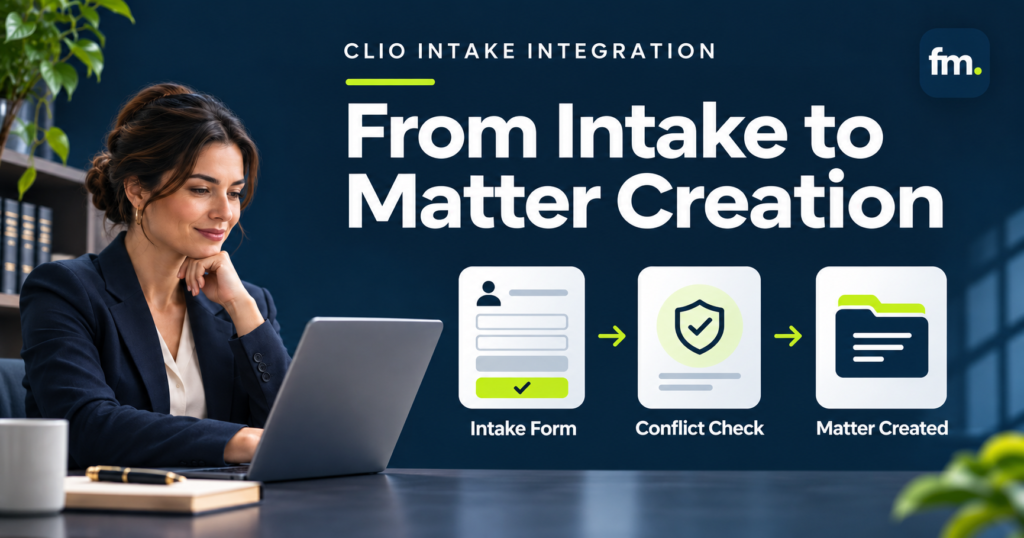
Clio intake integration works best when client information moves through a controlled process, from the first inquiry to conflict screening, attorney approval, and matter creation. This guide explains how to connect those steps, reduce repeated data entry, and build an intake workflow that keeps legal decisions in attorneys’ hands.
Quick Answer
Clio intake integration connects client intake forms, prospective client records, conflict checks, and matter management into a coordinated workflow.
Clio Grow can collect client information, organize intake activity, automate follow-ups, and support conflict screening. Once the firm approves representation and completes its required engagement steps, the information can move into Clio Manage for ongoing matter management.
However, connecting the two products does not automatically create a complete, attorney-controlled intake process.
A reliable system needs clear conditions for when a prospective client should move forward, when a potential conflict requires review, and when a new matter can be opened.
The goal is to automate administrative handling without automatically accepting representation or bypassing attorney judgment.
In This Guide
- How Clio intake integration works
- Building structured client intake forms
- Designing conflict checks and attorney approval gates
- Moving approved clients into Clio Manage
- Connecting engagement letters, payments, and other systems
- Common integration mistakes and how to prevent them
- A practical implementation checklist
What Is Clio Intake Integration?
Clio intake integration is the process of connecting prospective client information, intake tasks, conflict screening, and matter records so law firm staff do not have to manage every step separately.
The two core products are Clio Grow and Clio Manage.
Clio Grow focuses on prospective clients. It helps firms collect inquiries, request information, schedule consultations, and track opportunities before engagement.
Clio Manage supports active legal matters, including client records, documents, tasks, billing, and other practice management activities.
Together, they can support the movement from a new inquiry to an active client matter.
Clio’s newer unified experience uses the term opportunity for a prospective case before the firm takes it on. Older interfaces and support documentation may refer to these intake records as matters. The exact interface may differ depending on the firm’s account.
The important distinction is operational: a prospective client record should not be treated as an approved representation simply because information has entered the system.
Why Integration Matters
Consider a law firm receiving an inquiry through its website.
Without a connected process, staff may need to:
- Read the inquiry and create a contact record.
- Send a separate intake questionnaire.
- Copy submitted information into a spreadsheet or CRM.
- Search for possible conflicts.
- Contact an attorney for approval.
- Prepare an engagement agreement.
- Confirm the client’s signature and any required payment.
- Create the active matter and enter the same information again.
Each handoff introduces another opportunity for delay, missing information, or inconsistent records.
A properly designed integration reduces the repeated handling between these steps.
It also establishes clear ownership for decisions that should not happen automatically.
How a Complete Clio Intake Workflow Should Operate
The best starting point is to define the entire intake process before configuring software.
A practical workflow might follow this sequence:
New Inquiry → Intake Form → Data Validation → Conflict Check → Attorney Approval → Engagement Agreement → Required Payment Confirmation → Matter Creation
This sequence is an example of a recommended operating design, not a claim that every step is a built-in Clio automation.
Each stage should have a defined entry condition, completion requirement, and responsible person or system.
| Workflow stage | Automated handling | Human control |
| New inquiry | Capture contact details and source | Review unusual or urgent inquiries |
| Intake form | Request and collect structured information | Resolve incomplete or conflicting answers |
| Data validation | Identify missing required fields | Confirm disputed information |
| Conflict screening | Search available records and record potential matches | Determine whether representation is permissible |
| Attorney approval | Route the record for a decision | Approve, decline, or request more information |
| Engagement | Prepare and track required documents | Approve engagement terms where required |
| Payment | Record or confirm the required payment event | Resolve exceptions and special arrangements |
| Matter creation | Transfer approved information to Clio Manage | Verify correct client, matter, and ownership |
This structure separates administrative automation from professional responsibility.
The system can move information and prepare the next step. It should not decide whether a potential conflict is legally acceptable or whether a client has been accepted for representation.
Step 1: Build Structured Intake Forms in Clio Grow
A dependable intake process begins with information that can be reused.
If the firm collects incomplete or inconsistent details, those problems follow the matter into later workflows.
Clio Grow allows firms to create customized intake form templates, send forms to prospective clients, and make forms available through public links or website embedding.
According to Clio’s intake form documentation, firms can create different templates for different intake scenarios and connect supported form questions to custom fields.
Collect the Information Needed for the Next Decision
A useful intake form should collect enough information to determine the appropriate next step without asking unnecessary questions.
For example, an initial intake form might request:
- Prospective client’s name and contact details
- Practice area or type of legal issue
- Brief description of the matter
- Names of opposing parties and other relevant individuals or entities
- Relevant dates or deadlines
- Preferred communication method
The firm may request more detailed information later, once the initial screening requirements are satisfied.
This staged approach reduces the amount of information collected before the firm has determined whether it can proceed.
Use Custom Fields Instead of Unstructured Notes
Structured fields make information easier to search, transfer, and reuse.
A field labeled “Opposing Party Name” provides a clearer basis for later review than the same information buried in a long narrative response.
Clio Grow supports several question types, including text, dates, dropdowns, and checkboxes. Supported questions can also be connected to matching contact or matter custom fields.
Not every question type supports custom-field mapping.
For example, paragraph responses, multi-select fields, and file attachments have different limitations. Firms should confirm which fields will transfer into their intended records rather than assuming every form answer becomes a reusable CRM field.
The general rule is straightforward: information needed by another workflow should have a defined place in the data structure.
Separate Intake Records From Active Matters
A submitted intake form should create or update the appropriate prospective client record.
It should not independently signal that the firm has agreed to represent the person.
This distinction is especially important when website forms can create intake opportunities automatically.
The intake process should identify those records as pending review until the firm’s approval requirements have been satisfied.
Step 2: Build Conflict Checks Into the Workflow
Conflict screening is one of the most important control points in legal intake.
A law firm may receive a promising inquiry, collect complete information, and determine that the proposed representation raises a potential conflict.
The system must recognize that the ordinary onboarding path cannot continue until the issue is reviewed.
What Clio Conflict Checking Can Do
Clio supports conflict checks against existing contacts and matters.
Its conflict-checking documentation describes searching names, contact details, and other identifying information across Clio Grow and Clio Manage.
The feature supports different search parameters, review of potential matches, conflict statuses, notes, and downloadable reports.
For eligible accounts, conflict checks can be run within the intake process, and the resulting report can be associated with a matter.
These functions help organize the diligence process.
However, a search result is not a legal determination.
A potential match may require review, while a search with no results does not automatically establish that all applicable ethical requirements have been satisfied.
Design an Attorney-Controlled Conflict Gate
A conflict gate is a workflow condition that prevents the intake process from advancing until the required review is complete.
The recommended decision model is:
| Conflict review outcome | Required workflow action |
| No issue identified after required review | Continue to the next approved intake step |
| Potential conflict identified | Pause and assign attorney review |
| Additional information required | Request clarification and repeat the relevant check |
| Conflict prevents representation | Stop onboarding and initiate the firm’s approved decline process |
The distinction between a search result and an attorney’s decision should be explicit.
A system should not treat “no search results” as interchangeable with “approved to represent.”
Those are different states.
Use Tasks to Preserve the Review Point
Clio Grow’s automated workflow documentation describes task steps that pause subsequent workflow activity until the task is completed.
This provides a useful mechanism for building human review into intake.
For example, a conflict review task can be assigned to the appropriate attorney or authorized reviewer before the next client-facing step.
The task should contain enough information to support a decision and should make the required approval procedure clear.
Simply completing a generic task is not necessarily sufficient evidence that an attorney approved representation. The workflow should record the actual decision using the firm’s agreed process.
Preserve a Reviewable Record
The firm should retain relevant information about the conflict check, including the parties searched, review status, responsible reviewer, and decision.
Clio supports conflict-check reports and their association with matters.
An organized review record makes it easier to understand why an intake proceeded, stopped, or returned for further review.
This is particularly useful when several employees participate in the intake process.
Step 3: Add an Explicit Attorney Approve-or-Decline Gate
Conflict review and representation approval are related, but they are not identical.
A conflict check may not identify an issue, yet the attorney may still decline the matter because of capacity, scope, jurisdiction, timing, or other professional considerations.
A reliable intake system must account for both decisions.
Define Three Clear Outcomes
The recommended approval gate should allow the attorney to:
Approve: The prospective matter may proceed to the firm’s authorized engagement steps.
Decline: The onboarding workflow stops and the firm’s approved communication and record-retention procedures apply.
Request more information: The matter remains pending while staff or the prospective client provides additional details.
These choices prevent a common design problem: a workflow that treats every completed form as an accepted client.
What Happens After Approval?
Approval should trigger only the actions permitted by the firm’s operating policy.
Depending on the firm, those actions may include preparing a retainer agreement, requesting a signature, collecting a required payment, or assigning onboarding tasks.
The system should not skip any required engagement step merely because the conflict check has been completed.
An approval to proceed with engagement paperwork is not always the same as confirmation that representation has formally begun.
The firm must define that distinction in its workflow.
Step 4: Connect Engagement Agreements and Payment Requirements
After the firm decides to proceed, the next challenge is moving the prospective client through engagement without repeated manual coordination.
Clio Grow supports intake workflows involving emails, forms, appointments, documents, and tasks.
Depending on the firm’s technology and subscription, additional systems may be used for document generation, electronic signatures, or payments.
The operating design should establish exactly which event allows the workflow to advance.
Engagement Agreement Generation
An approved prospective client’s structured information can be used to prepare an engagement agreement, subject to the capabilities of the chosen document system.
For example, a firm might use a document automation tool to populate the client’s name, legal service description, and approved engagement terms.
An attorney may need to review the document before it is sent.
The system should also record the agreement’s status rather than assuming that sending it means it has been signed.
Payment-Triggered Progression
Some law firms require payment before particular onboarding steps occur.
Others open the matter earlier or handle payment through separate arrangements.
The automation should follow the firm’s engagement policy.
If payment confirmation is a required condition, the system should rely on an appropriate verified payment event, not merely the fact that a payment link was sent.
It should also account for failed payments, pending transactions, refunds, and exceptions.
This is where connected workflow architecture becomes more valuable than isolated task automation.
Step 5: Create the Matter in Clio Manage
Matter creation is the point where information collected during intake becomes part of the firm’s active practice management process.
Clio provides a native path for converting records from Grow to Manage.
According to Clio’s conversion documentation, users can open an eligible Grow record, select the conversion action, review required information, and complete the transfer to Clio Manage.
The exact labels and screens can vary between the older experience and unified Clio.
What Information Transfers?
Clio’s documented conversion process can transfer information such as contacts, supported custom fields, notes, submitted forms, attached files, and certain payment records.
However, not every field transfers automatically.
Its documentation identifies fields such as matter type, status, assignee, emails, and tasks as not converted through the documented process.
A firm should not assume that a completed intake workflow will produce a fully configured active matter without additional setup.
Map the Matter Before Conversion
Before creating an active matter, the firm should confirm the following:
| Data requirement | Verification |
| Client identity | Correct person or organization selected |
| Related parties | Relevant contacts associated with the right roles |
| Practice area | Appropriate matter classification established |
| Matter description | Approved scope accurately reflected |
| Responsible attorney | Correct ownership assigned |
| Custom fields | Required information mapped and available |
| Conflict decision | Required review completed and recorded |
| Engagement status | Required agreement steps verified |
| Payment status | Applicable payment prerequisites satisfied |
These checks help prevent incomplete or incorrectly configured matters from entering the active caseload.
Prevent Duplicate Matter Creation
Duplicate records can create reporting problems, conflicting instructions, and unnecessary follow-up work.
Before creating a new matter, the workflow should check whether the intake record has already been converted or whether an active matter exists for the same engagement.
For custom integrations, a useful design is to store a persistent record identifier and check the previous creation result before repeating an action.
The system should distinguish between a genuine failure and a response that was delayed after the matter was successfully created.
Otherwise, retrying a failed-looking step may create another matter.
Native conversion and custom API-based matter creation should not be treated as identical processes. The available controls depend on how the integration is built.
Step 6: Connect Clio With the Rest of the Law Firm’s Technology
Clio Grow and Clio Manage can provide the core intake and matter management environment.
A firm may still need other tools for specialized documents, payments, notifications, or operational tasks.
The decision to add an integration should begin with a specific workflow requirement.
For example, a firm might use:
- Clio Grow for prospective client intake
- Clio Manage for active matter records
- Gavel for specialized document generation
- Make.com for supported cross-platform workflow orchestration
- Stripe for payment processing where appropriate
- Gmail or Microsoft 365 for communications
This is an example architecture, not a promise that every connection or operation is available through a particular Clio subscription.
Establish a System of Record
Every important piece of information should have a clearly designated owner.
For example, Clio Manage may be the authoritative source for active matter details, while an external document system uses approved information to generate legal documents.
If multiple systems can change the same information independently, the firm needs rules for resolving differences.
Without those rules, a corrected address or updated client name may appear in one system while the old information remains elsewhere.
A connected workflow should define where information originates, which changes are allowed, and how updates are synchronized.
Understand Synchronization Limits
Synchronization is not always complete or bidirectional.
For example, Clio’s custom-field synchronization guidance describes limitations affecting certain custom field types and updates between Grow and Manage.
Because Clio is also introducing unified account experiences, firms should verify the behavior available in their own environment.
A functioning integration should be tested with actual field values before being trusted with production records.
Firm in Motion Field Note: Building an Attorney-Controlled Intake System
Firm in Motion has implemented law-firm operations workflows connecting Clio Manage, Gavel, Make.com, Stripe, Gmail, and Google Calendar.
The work included intake, conflict review, attorney approval and decline decisions, retainer generation, payment handling, matter creation, and downstream workflow progression.
The important challenge was not simply connecting the applications.
It was defining when a workflow should continue, wait for a decision, return for correction, or stop.
A client could submit complete information without being approved for representation.
A payment process could begin without the required payment being confirmed.
A generated document could require attorney edits before release.
Each condition needed an explicit place in the operating design.
The implementation approach separated repeatable administrative handling from legal decisions.
Automation handled the movement of information and routine progression where the required conditions were satisfied. Attorneys retained control over consequential decisions.
This illustrates the systems-first principle behind Firm in Motion’s law firm operations automation.
A successful integration is not measured only by the number of connected applications. It is measured by whether work moves correctly through the firm’s real operating conditions.
Common Clio Intake Integration Mistakes
Several design mistakes can weaken an otherwise useful intake setup.
Treating Form Submission as Client Acceptance
Submitting a form means the prospective client provided information.
It does not establish that a conflict check was completed, representation was approved, or the firm’s engagement requirements were met.
Better approach: Keep prospective records in a pending intake state until the required decisions and conditions are satisfied.
Collecting Information Without a Data Model
A form may collect useful answers that cannot be mapped to downstream records.
Staff then have to copy the information manually.
Better approach: Identify required contact and matter fields before building the questionnaire. Test how supported fields transfer.
Treating Conflict Search Results as Legal Clearance
Search tools can surface possible matches, but a result list cannot replace the firm’s professional conflict analysis.
Better approach: Require documented review and an explicit decision before the workflow proceeds.
Creating Matters Before the Required Gates
Premature conversion can introduce incomplete or unapproved records into the active matter system.
Better approach: Establish a matter-creation checklist tied to the firm’s actual approval and engagement rules.
Ignoring Failed Integrations
A workflow may successfully collect information but fail while creating a matter or transferring fields.
Without monitoring, staff may assume the process finished.
Better approach: Include error tracking, notifications, controlled retries, and a clear recovery procedure.
Testing Only the Ideal Client Journey
A demonstration often follows a simple path: complete form, no conflict, signed agreement, successful payment, and new matter.
Production workflows also encounter incomplete forms, duplicated inquiries, unclear conflict results, declined engagements, and payment failures.
Better approach: Test normal conditions and exceptions before launch.
A Practical Clio Intake Integration Checklist
Use this checklist to evaluate whether an intake system is ready for daily use.
| Checkpoint | What to confirm |
| Intake forms | Required information is collected clearly |
| Data mapping | Contact and matter fields are mapped correctly |
| Duplicate handling | Existing contacts and matters are checked |
| Conflict screening | Relevant parties and available records are searched |
| Attorney approval | An explicit decision is required and recorded |
| Decline process | Rejected inquiries stop the correct workflow actions |
| Engagement | Required agreements are tracked |
| Payment | Applicable payment conditions are verified |
| Matter creation | Approved records transfer with correct ownership |
| Synchronization | Required data stays consistent across systems |
| Error recovery | Failed or interrupted actions can be investigated |
| Maintenance | Someone owns changes, testing, and support |
Not every firm needs the same number of automation steps.
A smaller practice may begin with forms, conflict checks, and manually approved matter conversion.
A higher-volume firm may need more advanced orchestration, multiple intake paths, and additional system integrations.
The objective is not maximum automation. It is a controlled, maintainable process that fits the firm’s workload.
How to Measure Clio Intake Integration Performance
An intake system should be evaluated against measurable operational outcomes rather than the number of automation features enabled.
Useful measures include:
| Metric | What it reveals |
| Inquiry-to-first-response time | How quickly prospective clients receive an initial response |
| Intake completion rate | Whether forms are usable and appropriately timed |
| Time awaiting conflict review | Whether an approval gate is becoming a bottleneck |
| Approved-to-matter-creation time | How efficiently authorized work enters the active system |
| Duplicate record rate | Whether identity and record handling are reliable |
| Failed transfer count | Whether integrations are operating consistently |
| Manual handling per matter | How much repetitive coordination remains |
The firm should establish a baseline before implementation.
For example, if approved matters regularly require several separate data-entry actions, the firm can measure whether the new workflow removes those actions.
Improvement should also be evaluated against accuracy, exception handling, and attorney control.
A faster workflow that creates incorrect matters is not an operational improvement.
Frequently Asked Questions
Can Clio Grow automatically create a matter in Clio Manage?
Clio Grow supports converting prospective intake records into Clio Manage matters. Native conversion is documented as a user-initiated process, while other automation behavior depends on the available product features and integration design. Firms should not assume an approved form automatically creates an active matter without configuration.
Does Clio Grow support conflict checks?
Yes. Clio supports conflict checking across available contact and matter records, with search results, statuses, notes, and reports. Availability depends on the firm’s subscription and permissions. An attorney or appropriately authorized professional remains responsible for the substantive conflict decision.
Can Clio intake forms be embedded on a law firm’s website?
Yes. Clio Grow supports public intake form links and website embedding. Firms can configure form settings and use the link to collect information from prospective clients.
Can Clio Grow and Clio Manage share custom fields?
Yes, supported custom fields can be synchronized and used in the intake process. However, field-type restrictions and synchronization behavior depend on the applicable Clio experience. Firms should test required data transfers before deployment.
Do law firms need Make.com for Clio intake integration?
No. Basic intake, conflict checks, and conversion between Grow and Manage can use native Clio capabilities. An external orchestration tool may be useful when the firm needs additional steps across other supported applications or more specialized workflow logic.
Should matter creation happen before or after payment?
That depends on the firm’s engagement terms, accounting requirements, and operating policy. The system should be designed around those requirements rather than assuming one universal sequence.
Conclusion: Build a Controlled Intake-to-Matter System
Clio intake integration can reduce repeated administrative work and improve how prospective client information moves into active matters.
The strongest implementations begin by defining the process before configuring the technology.
Forms should collect useful structured information. Conflict checks should lead to documented review. Attorney approval should control whether the intake proceeds. Matter creation should occur only when the firm’s required conditions are satisfied.
Clio Grow and Clio Manage provide important parts of that process, but the complete operating system also depends on data mapping, decision rules, integrations, testing, and clear ownership.
A well-designed intake system knows when to move forward and when to stop.
That is how a firm can reduce manual coordination without losing control over representation decisions.
Schedule Your Law Firm Audit to identify where your intake process relies on repeated data entry, disconnected software, or manual handoffs, and discover what can be automated while keeping attorneys in control.