
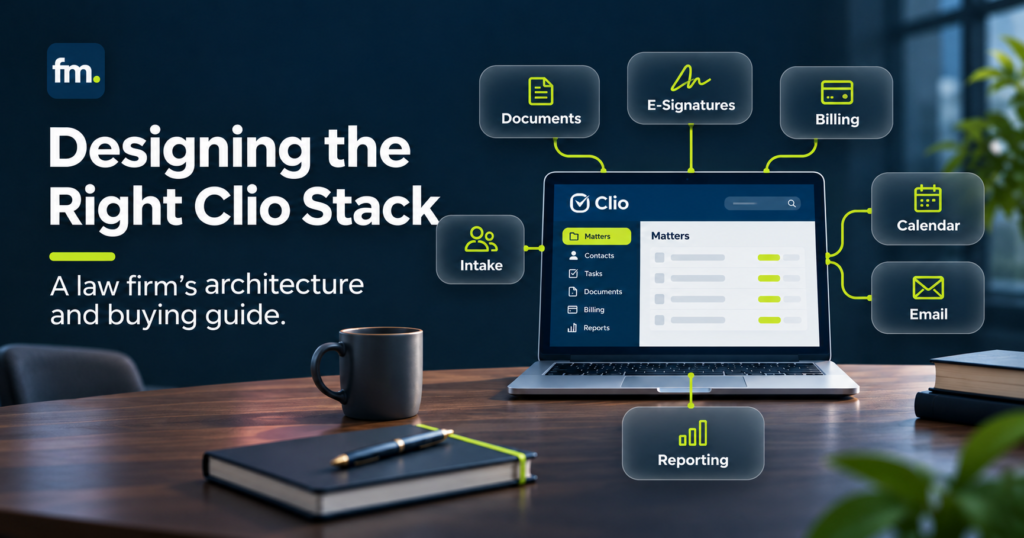
Clio integrations can help law firms connect client intake, document automation, billing, calendars, and matter management. But connecting applications is only the beginning. The real value comes from designing how information moves between systems, which actions trigger the next step, and where attorney approval must remain.
This guide explains how to evaluate Clio integrations, choose the right architecture, understand implementation costs, and build reliable workflows that support everyday legal operations.
Quick Answer
Clio integrations connect Clio Manage or Clio Grow with other software used by law firms. Depending on the applications and configuration, these connections may transfer information, synchronize records, trigger workflow actions, or support document and billing processes.
Law firms can use native integrations, third-party automation platforms, or custom API connections.
The best approach depends on the firm’s workflow requirements, data structure, budget, and need for attorney oversight.
Before purchasing an integration, define what information must move, which system owns each record, what triggers the transfer, and how errors will be handled.
The goal is not to connect more applications. It is to create a law firm operating system that moves work reliably.
In This Guide
This article covers the types of Clio integrations available, common law firm use cases, system architecture, implementation costs, security requirements, vendor selection, and a practical deployment framework.
Why Clio Integrations Matter for Law Firm Operations
Many law firms already use several software platforms to manage their work.
Clio may handle matter records, time tracking, billing, and case-related information. Other tools may manage prospective clients, document production, electronic signatures, accounting, or communication.
Each application can perform its own function effectively.
The difficulty begins when information must move between them.
A potential client submits an intake form. A staff member copies the information into another system. An attorney reviews the matter. Someone prepares an engagement agreement, sends a payment request, and updates the matter record.
When these steps depend on separate manual actions, the process becomes harder to manage.
Clio integrations can reduce repeated handling by connecting selected activities.
However, an integration is only useful when it reflects the firm’s actual operating requirements.
For example, transferring a contact into Clio does not automatically determine whether the person has passed conflict review or whether representation has been approved.
Those decisions require separate workflow rules.
A systems-first approach begins by defining the process before selecting the technology.
Types of Clio Integrations: Three Approaches
Law firms generally have three main options for connecting Clio with other applications.
Each approach offers different levels of flexibility, implementation effort, and ongoing responsibility.
1. Native and Prebuilt Integrations
Native or prebuilt integrations are connections provided by Clio or third-party software vendors.
Clio maintains an official App Directory where firms can explore compatible applications.
These connections may support activities such as accounting synchronization, document generation, calendar management, and communication.
For example, Clio offers an integration with QuickBooks Online for supported accounting workflows.
Native integrations are often a sensible starting point because they may require less custom development.
However, firms should not assume that every listed integration transfers all information in both directions.
Supported records, synchronization behavior, subscription requirements, and regional availability must be verified.
2. Third-Party Automation Platforms
Automation platforms can coordinate activity between Clio and other applications.
For example, a firm may use Zapier or a compatible Make.com workflow to connect approved data transfers and administrative processes.
These platforms can be useful when the firm needs conditional steps that extend beyond the functions of a prebuilt connection.
A workflow might begin when an approved intake reaches a particular status, then update a record or notify the responsible employee.
The implementation must still account for authorization, duplicate records, missing data, and failed actions.
Automation platforms are not substitutes for workflow design.
They execute the logic that has been configured.
3. Custom API Integrations
Custom integrations use application programming interfaces, or APIs, to exchange information with Clio.
Clio provides developer documentation for supported integrations through its Clio Manage API and Clio Platform API.
As documented in 2026, these are distinct developer interfaces with different resources and implementation requirements.
Custom development may be appropriate when the firm needs specialized data mapping, complex event handling, or functionality that available applications do not provide.
However, custom integrations require technical ownership, testing, monitoring, and maintenance.
They should be selected because the workflow requires them, not simply because custom development is available.
Comparing Integration Approaches
| Approach | Best Fit | Main Consideration |
| Native integration | Standard, supported workflows | Limited to the vendor’s supported features and data behavior |
| Automation platform | Multi-application workflows with conditional actions | Requires reliable logic, monitoring, and error recovery |
| Custom API integration | Specialized or complex data and workflow requirements | Higher implementation and maintenance responsibility |
The appropriate choice depends on the process, not the number of available features.
Common Clio Integrations Law Firms Should Evaluate
A law firm’s integration priorities should reflect its most repetitive and operationally important work.
Client Intake and CRM
Clio Grow supports prospective client intake and works alongside Clio Manage.
According to Clio’s documentation, firms can manage leads in Grow and transfer information into Manage as matters progress.
Firms may also connect website intake sources through supported integration methods.
The key design question is when an inquiry should become an active matter.
A website submission should not automatically authorize representation.
The process should account for screening, conflict review, and the responsible attorney’s decision.
Document Automation
Document automation tools can use structured information to produce contracts, engagement agreements, and other legal documents.
For example, Gavel’s Clio integration connects legal document automation capabilities with Clio Manage.
A firm may want relevant client or matter information to support document preparation without repeatedly entering the same facts.
The integration must define where information originates, how it is mapped, and how updated information is handled.
Substantive document review remains an attorney responsibility.
Accounting and Billing
Clio’s QuickBooks Online integration supports selected accounting processes, including approved bills, certain transactions, and related accounting records.
The exact synchronization behavior depends on configuration and supported features.
For example, the official QuickBooks Online integration guide identifies specific requirements for matching records, mapping accounts, and managing synchronization.
Accounting connections require particular attention because inaccurate mappings can affect financial records.
A firm should involve its accountant or other qualified financial professional when defining the integration.
Email and Calendar Management
Calendar integrations can help keep scheduled activities visible across systems.
Clio Manage supports calendar synchronization with compatible Google and Microsoft 365 calendars.
Its calendar documentation describes bidirectional synchronization and cautions against connecting the same Clio calendar to both Google and Microsoft 365 simultaneously.
The firm should determine which calendar owns particular events and how staff should handle changes.
Calendar synchronization should also be distinguished from automated legal deadline calculation or professional responsibility for calendaring accuracy.
Workflow and Administrative Automation
Some firms need integrations that coordinate several applications rather than synchronize a single category of information.
For instance, a firm may connect approved intake records, engagement documentation, payment processing, matter creation, and client communication.
This requires a broader design that identifies the conditions under which each step may proceed.
That architecture is often more important than the individual connector.
How to Design a Reliable Clio Integration Architecture
A reliable integration starts with a clear understanding of the firm’s operating process.
Before connecting applications, the firm should determine how work enters the system, where it waits, what information it needs, and which events allow it to progress.
Define the System of Record
A system of record is the application responsible for maintaining the authoritative version of specific information.
A firm might designate Clio Manage as the authoritative source for active matter records.
A separate intake application may remain responsible for prospective client information before engagement.
An accounting platform may maintain certain general ledger records.
The important point is that ownership must be explicit.
Otherwise, two applications may contain different versions of the same information without a clear rule for resolving inconsistencies.
Map the Data
A data map identifies exactly which information transfers between systems.
For example:
| Information | Source | Destination | Control |
| Prospective client details | Intake system | Approved downstream record | Intake screening |
| Engagement status | Attorney-approved workflow | Matter management | Representation approval |
| Document information | Structured matter data | Document generation system | Data validation |
| Approved billing information | Clio Manage | Accounting platform | Financial mapping and review |
| Client communication status | Workflow system | Appropriate matter record | Authorized status update |
This table is an illustrative architecture, not a statement that every listed transfer is available natively.
Each transfer must be validated against the actual applications and integration capabilities.
Define Workflow States and Approval Gates
A workflow state describes the current condition of a process.
Examples include Submitted, Pending Review, Approved, Awaiting Payment, Active, and Closed.
A workflow should move between states only when the required conditions have been met.
Consider an intake process:
Inquiry Received → Conflict Review → Attorney Decision → Engagement Agreement → Payment Confirmation → Matter Setup
A declined inquiry should not continue into an approved engagement workflow.
An incomplete payment should not trigger an action that depends on confirmed payment.
A document needing legal correction should return to review instead of proceeding automatically.
These conditions are what turn a series of software connections into a governed operating system.
Design for Failures and Exceptions
Real integrations experience interruptions.
A token may expire, required information may be missing, an external service may become unavailable, or an application may reject an update.
A production workflow should define how these situations are detected and resolved.
Important safeguards include:
- Duplicate-prevention rules
- Error logging and alerts
- Controlled retry behavior
- Record reconciliation
- Clear exception ownership
- Recovery and manual intervention procedures
Clio’s developer documentation identifies API rate limits and provides guidance for handling rate-limit responses.
The Clio Manage API and Clio Platform API have different documented limits, which developers must account for.
Event-driven integrations using webhooks also require proper security, expiration management, and error handling.
These technical requirements should be considered during architecture, not discovered after launch.
Firm in Motion Field Note: Attorney-Controlled Clio Workflows
Firm in Motion has implemented law-firm operating workflows connecting Clio Manage with tools including Gavel, Make.com, Stripe, Gmail, and Google Calendar.
The implementation involved processes such as intake handling, conflict review, attorney approval or decline, engagement documentation, payment-dependent progression, and matter record updates.
The central challenge was not simply connecting these applications.
It was determining when the workflow should continue, wait, stop, or return for review.
For example, an integration capable of creating a matter record still needs to know whether the matter has been approved for representation.
The architecture must distinguish technical capability from operational permission.
In this implementation, attorney decisions were retained at consequential points while repeatable administrative activities were coordinated through the connected systems.
This is a specific implementation example, not a guarantee that every firm will achieve the same outcome.
Explore Firm in Motion’s Systems Built for more information about its approach to legal automation architecture.
Clio Integrations Buying Guide: What to Evaluate Before Purchasing
Selecting an integration should begin with a written set of requirements.
The number of available features matters less than whether the application supports the firm’s actual workflow.
1. Confirm the Business Requirement
Identify the specific problem.
Does the firm need to eliminate repeated contact entry, improve billing synchronization, automate document preparation, or coordinate a multi-step matter workflow?
Each objective may require a different solution.
Avoid purchasing an integration merely because the applications appear compatible.
2. Verify the Supported Data and Actions
Ask the provider which records the integration can read, create, update, or synchronize.
Confirm whether the connection is one-way or bidirectional.
Also ask what happens when an existing record changes.
An integration that transfers contacts may not automatically support the firm’s custom matter fields, approval states, or document requirements.
3. Examine Security and Access Controls
Determine what data the application can access and how permissions are granted.
For custom integrations, review authorization methods, credential management, and access restrictions.
The provider should explain how sensitive data is protected during transfer and storage.
4. Evaluate Reliability
Ask how the integration detects failures.
Does it produce error notifications? Can failed records be retried safely? Can staff identify which transactions completed successfully?
A reliable integration should provide enough visibility for the firm to recognize and resolve problems.
5. Clarify Implementation Responsibilities
A purchased application does not necessarily include complete workflow design.
The provider’s responsibilities should be defined.
These may include configuration, data mapping, testing, staff training, documentation, and post-launch support.
6. Check Compatibility and Maintenance
Before purchasing, confirm current compatibility with the firm’s Clio products, region, subscription, and other applications.
Ask how the provider handles software updates and changes to integration behavior.
The firm should know who will maintain the connection after implementation.
7. Request a Realistic Demonstration
A demonstration should reflect the firm’s workflow, not just a generic product presentation.
For example, ask the provider to show how the system handles an incomplete intake, rejected approval, duplicate record, or failed transfer.
These scenarios often reveal whether a solution is ready for actual operations.
A Practical Vendor Evaluation Scorecard
Rate each category from 0 to 2.
| Evaluation Area | What to Check |
| Workflow fit | Does it support the required process? |
| Data compatibility | Does it handle the necessary records and fields? |
| Attorney control | Can consequential actions be held for review? |
| Security | Are access and confidentiality requirements addressed? |
| Reliability | Are failures visible and recoverable? |
| Maintainability | Can the system be updated and supported? |
| Total cost | Are all initial and recurring expenses clear? |
A score of 2 means the requirement is clearly supported, 1 means partially supported, and 0 means unsupported or unverified.
This is a planning framework, not an official Clio certification method.
A critical failure in confidentiality, data integrity, or attorney control should not be overlooked simply because the total score is high.
What Do Clio Integrations Cost?
Clio integration costs depend on the applications involved and the scope of implementation.
There is no single price that applies to every connected workflow.
A simple prebuilt connection may have different costs from a custom system involving several platforms and complex approval logic.
Main Cost Categories
Software subscriptions: The firm may need Clio subscriptions and additional third-party application plans.
Integration platform fees: Automation tools may charge according to usage, subscriptions, or other service terms.
Implementation services: Professional fees may cover discovery, configuration, data mapping, development, and testing.
Migration and cleanup: Existing records may require preparation before they can be synchronized reliably.
Training and documentation: Staff need instructions for operating the workflow and handling exceptions.
Ongoing support: Integrations may require monitoring, updates, troubleshooting, and periodic review.
Estimate the Total Cost of Ownership
When comparing options, consider both upfront and recurring expenses.
A practical budgeting formula is:
First-Year Cost = Initial Implementation + 12 Months of Recurring Software and Support + Expected Maintenance and Usage Costs
This is a planning calculation, not a guaranteed cost estimate.
The firm should also account for internal staff time spent on discovery, testing, training, and ongoing administration.
A low subscription price does not necessarily mean a low total implementation cost.
Likewise, a more substantial build may be appropriate when the workflow requires complex data relationships or critical controls.
The buying decision should reflect the complete operating requirement.
A Five-Stage Clio Integration Implementation Plan
A phased implementation can help firms avoid connecting too many applications before the underlying process is defined.
Stage 1: Discovery
Map existing workflows, identify manual handoffs, and document the applications currently in use.
Clarify the business outcome and required attorney decisions.
Deliverable: Current-state workflow and requirements document.
Stage 2: Architecture
Assign systems of record, map data fields, define workflow states, and establish approval rules.
Document error handling and security requirements.
Deliverable: Integration architecture and implementation specification.
Stage 3: Configuration and Development
Configure native applications or build the required automation.
Use controlled test data where possible and avoid unnecessary access to live confidential records during development.
Deliverable: Configured and connected workflow.
Stage 4: Testing and Validation
Test normal scenarios and exceptions.
Verify data accuracy, duplicate prevention, authorization, failed transfers, and attorney approval controls.
Deliverable: Testing results, corrections, and user acceptance sign-off.
Stage 5: Launch and Handover
Train staff, document system ownership, and establish procedures for monitoring and maintenance.
The firm should understand how to operate the workflow and when technical support is required.
Deliverable: Production system, operating documentation, and support plan.
A project should not be considered complete simply because one successful demonstration has been performed.
Security and Professional Responsibility Considerations
Clio integrations may involve sensitive client information, financial records, and confidential legal communications.
Every additional application introduces another connection that the firm must evaluate.
In the United States, ABA Model Rule 1.6 requires lawyers to make reasonable efforts to prevent unauthorized access to or disclosure of information relating to client representation.
Applicable state rules and other legal obligations must also be considered.
A firm should evaluate the provider’s data handling, access controls, confidentiality commitments, and retention practices.
For integrations involving financial records, the firm should establish appropriate accounting controls and review requirements.
The architecture should also preserve attorney authority over representation decisions and substantive legal work.
Automation can handle repeatable administrative processing. It should not silently substitute for professional judgment.
Common Clio Integration Mistakes to Avoid
Several mistakes can make otherwise useful integrations difficult to operate.
Connecting applications without mapping the workflow: This may automate inconsistent processes instead of improving them.
Allowing duplicate records: Without record matching and ownership rules, different applications may create competing versions of the same contact or matter.
Assuming every integration is bidirectional: Some connections only transfer selected information in one direction.
Ignoring attorney approval points: A technical trigger should not automatically authorize representation or document release.
Skipping exception testing: A workflow that works only under ideal conditions may fail during ordinary operations.
Leaving maintenance undefined: Someone must remain responsible for access permissions, error monitoring, and changes after launch.
The strongest implementations address these issues before deploying the workflow.
Frequently Asked Questions
What are Clio integrations?
Clio integrations are connections between Clio products and other applications used by law firms. They can support data sharing, record synchronization, document workflows, accounting processes, and administrative automation, depending on the tools involved.
Does Clio integrate with other legal software?
Yes. Clio maintains an App Directory that includes applications across multiple categories, such as document automation, accounting, communication, intake, and productivity. Compatibility and supported features vary by application and region.
Can Clio integrate with Gavel?
Yes. Clio lists Gavel Document Automation in its App Directory as an integration with Clio Manage. Firms should verify that the available connection supports their specific document and data requirements.
Can Clio integrations automate client intake?
Yes, supported integrations can assist with capturing and transferring prospective client information.
However, initial screening, conflict review, and acceptance of representation should follow the firm’s approved procedures.
Is a custom Clio API integration necessary?
Not always. Native connections may be sufficient for straightforward requirements.
Custom development is more appropriate when existing integrations cannot support the required data structures, workflow rules, or technical conditions.
How long does a Clio integration project take?
The timeline depends on the number of applications, data complexity, available integration methods, testing requirements, and internal approvals.
A limited connection may require substantially less work than a multi-stage legal automation system.
A responsible proposal should define project milestones rather than promise a universal completion time.
How can a law firm measure integration success?
Useful measures include fewer repeated data-entry actions, reduced duplicate records, improved workflow completion reliability, faster administrative handoffs, and fewer unresolved synchronization errors.
The firm should establish baseline measurements before implementation and evaluate actual results after launch.
Conclusion: Build the Workflow Before Connecting the Tools
Clio integrations can support more efficient legal operations, but their value depends on how well they fit the firm’s operating process.
A collection of connected applications is not automatically a reliable system.
The firm must define where information originates, which records should remain authoritative, what triggers each action, and where attorney judgment is required.
It must also account for incomplete information, rejected approvals, failed transfers, and changing operational requirements.
The right buying decision begins with those questions.
Native integrations, automation platforms, and custom APIs each have a place. The best option is the one that supports the required workflow without creating unnecessary complexity or maintenance obligations.
For law-firm owners and operations leaders, the objective is not to purchase every available connection.
It is to create dependable infrastructure that allows repeatable work to move while attorneys retain control over consequential decisions.
Build a Connected, Attorney-Controlled Law Firm System
Firm in Motion designs and implements connected legal workflows across intake, document production, payments, and matter management.
If your firm is evaluating Clio integrations or struggling with disconnected applications, Schedule Your Law Firm Systems Audit to identify manual handoffs, define integration priorities, and understand what can be automated.
Sources and Further Reading
- Clio: Official App Directory
- Clio: Manage API Documentation
- Clio: Platform API Documentation
- Clio: Manage and Platform API Differences
- Clio: Gavel Document Automation Integration
- Clio: QuickBooks Online Integration
- Clio: Calendar Synchronization
- Clio: Grow Product Documentation
- American Bar Association: Model Rule 1.6

