
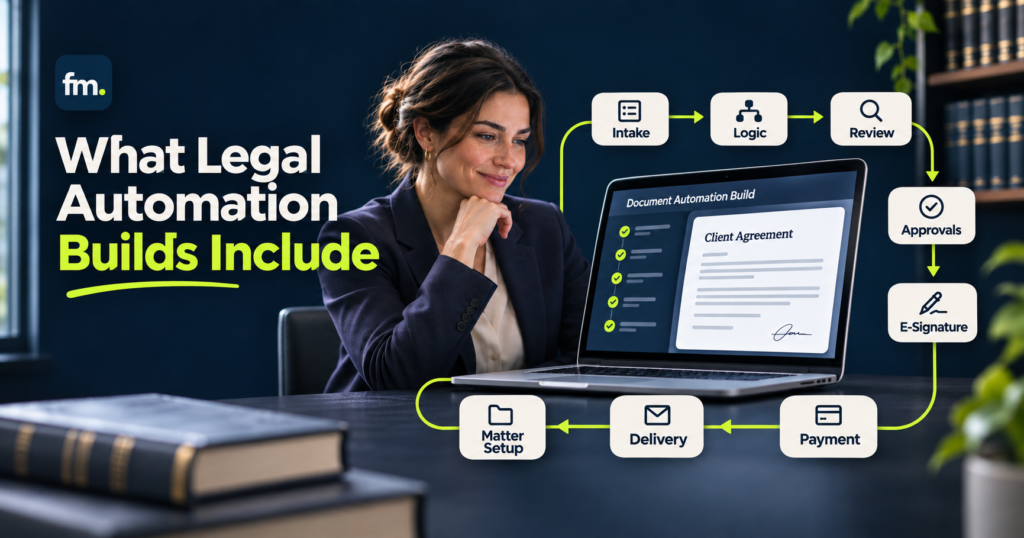
Legal document automation services help law firms replace repetitive drafting, disconnected templates, and manual data entry with structured systems that generate consistent legal documents. A complete implementation goes beyond inserting client names into Word templates. It connects intake, legal logic, document production, attorney review, and delivery into a reliable workflow.
Quick Answer
A full legal document automation build typically includes workflow discovery, template review, structured data modeling, conditional clause logic, automated document generation, system integrations, attorney approval controls, testing, and staff training.
The purpose is to create a repeatable document production system where information is collected once, reused accurately, and transformed into the appropriate documents under defined rules.
The best implementations automate routine production while keeping legal analysis, substantive review, and final approval with qualified attorneys.
In This Guide
This guide explains what legal document automation services include, how a complete build works, which deliverables to expect, what affects implementation costs, and how to determine whether a provider can build a dependable production system rather than a collection of disconnected templates.
What Are Legal Document Automation Services?
Legal document automation services involve designing and implementing systems that create legal documents using structured information, reusable templates, and predefined rules.
Instead of repeatedly copying client details into contracts, agreements, pleadings, or estate-planning documents, a firm collects the necessary information through an organized process.
The system then uses that information to generate the appropriate documents.
For example, an estate-planning attorney may need to prepare several instruments containing the same client names, family relationships, fiduciary appointments, and distribution instructions.
Without automation, those details may need to be entered and checked across multiple documents.
A document automation system can maintain shared information and apply it consistently throughout the document package.
However, automation software alone does not create a complete operating system.
The underlying questions, data structures, legal rules, and approval requirements must be designed and maintained.
That implementation work is the central purpose of professional document automation services.
What Does a Full Legal Document Automation Build Include?
A full implementation generally consists of several connected components.
Each component supports a different part of the document production process.
1. Workflow Discovery and Requirements Mapping
The first step is understanding how the firm currently prepares documents.
A service provider should examine the existing process from information collection to final delivery.
This includes identifying:
- Which documents the firm prepares repeatedly.
- What information each document requires.
- Which facts appear in multiple documents.
- Where staff copy or re-enter information.
- Which clauses change under specific conditions.
- Which decisions require attorney judgment.
- How drafts are reviewed, approved, and stored.
The discovery phase should also identify exceptions.
For example, a trust package involving multiple beneficiaries, alternate fiduciaries, or unusual distribution instructions may require additional questions and review.
The resulting deliverable should be a documented workflow and an agreed automation scope.
Without this stage, firms risk automating an inconsistent or poorly understood drafting process.
2. Document Template Review and Standardization
An automation system depends on the quality of its underlying templates.
Before configuring software, the firm’s existing documents should be reviewed for inconsistent wording, duplicated provisions, outdated language, and conflicting formatting.
The responsible attorneys must approve the substantive legal content.
Once approved, templates can be organized into reusable structures.
A contract template, for example, may contain fixed language, variable client information, optional provisions, and sections that depend on specific answers.
The automation builder translates these requirements into technical rules.
This distinction matters because automating an outdated template does not correct its legal content.
A full implementation should establish clear template ownership, version control, and a process for future changes.
3. Structured Data Modeling
Data architecture is one of the most important components of legal document automation.
The system must define how information is collected, stored, referenced, and reused.
A poorly designed workflow may collect the same person’s details several times because different documents refer to that person in different roles.
A stronger design creates a reusable person or entity record.
For example, one individual might appear as a beneficiary, successor trustee, and authorized representative across different instruments.
The system should maintain that individual’s core identity information in one place while tracking each separate legal role.
This approach reduces unnecessary data entry and makes document relationships easier to manage.
A complete data model should account for required fields, repeated people or entities, conditional questions, validation rules, and how information is passed into document templates.
The goal is simple: enter facts once and reuse them consistently where appropriate.
4. Conditional Logic and Clause Selection
Conditional logic determines which document language appears based on the information provided.
This is where document automation becomes more sophisticated than basic mail merge.
For example, a contract may require different provisions depending on the number of parties, payment structure, jurisdiction, or type of transaction.
An estate-planning workflow may need to account for successive fiduciary appointments, beneficiary relationships, and distribution conditions.
The builder translates attorney-approved requirements into rules that control document outputs.
These rules may determine whether a clause is included, which person appears in a particular role, or how several related provisions interact.
The difficult part is not simply adding conditions.
It is ensuring that the conditions remain consistent throughout the entire document package.
A reliable implementation should centralize reusable logic wherever possible rather than rebuilding similar rules separately in every template.
5. Automated Document Generation
Once the data model and rules are established, the system can generate documents using the approved templates.
Depending on the platform and implementation, outputs may include Microsoft Word files, PDFs, or coordinated document packages.
For example, a firm might use one structured intake workflow to produce an engagement agreement, supporting authorization forms, and related correspondence.
The document generation process should preserve formatting, numbering, headings, signature blocks, and references between related provisions.
It should also support a practical correction process.
If an attorney identifies an incorrect fact, the team should be able to update the appropriate source information and regenerate affected documents without unnecessarily repeating the entire intake.
A complete build should therefore address both initial generation and subsequent revisions.
6. Integration With Existing Law Firm Software
Document production rarely operates in isolation.
A firm may already use separate applications for client intake, matter management, electronic signatures, payments, and document storage.
A full-service implementation may connect document automation to these systems when the integration provides genuine operational value.
For example, a firm using Clio Manage and Gavel may want approved client or matter information to support document generation.
Other workflows may use Make.com to coordinate authorized actions between applications.
The integration design should explain which system owns each record, what information moves between tools, and which event allows the next step to occur.
It should also address duplicate records, failed transfers, outdated information, and system interruptions.
Not every firm needs complex integrations.
The appropriate architecture depends on how documents fit into the firm’s larger operating process.
For more on connected legal systems, explore Firm in Motion’s Legal Workflow Automation solutions.
7. Attorney Review and Approval Controls
Legal document automation should preserve professional judgment rather than attempt to replace it.
An automated document may contain the correct information according to its programmed rules while still requiring legal review.
A complete workflow should clearly identify when an attorney must inspect, revise, or approve a document.
For example, document generation may produce a draft that remains pending until the responsible attorney approves it.
If corrections are required, the system should support revision and resubmission.
Only an approved document should proceed to the authorized signature, filing, or delivery stage.
The exact controls depend on the practice area, document type, and firm’s internal responsibilities.
The important principle is that technical automation must not be mistaken for substantive legal approval.
8. Testing, Quality Assurance, and Staff Training
A document automation build is not complete when a single demonstration produces the expected output.
The workflow must be tested against realistic scenarios.
Testing should include ordinary matters, incomplete information, repeated parties, unusual combinations of answers, and changes to previously entered facts.
The implementation team should verify that the correct clauses appear, irrelevant provisions are excluded, and information remains consistent across all generated documents.
The firm should also test the review and correction process.
After the system passes agreed acceptance criteria, staff training should explain how to enter data, generate documents, handle errors, request attorney approval, and maintain the workflow.
Documentation should make the system understandable even when the original builder is unavailable.
Template Automation vs. Full Document Automation Systems
Not every automation project needs the same implementation scope.
Some firms only need a few reusable templates, while others require coordinated document packages and connected operational workflows.
| Capability | Basic Template Automation | Full Document Automation Build |
| Data collection | Individual forms or fields | Structured, reusable data model |
| Document logic | Simple variables | Conditional rules and complex relationships |
| Document generation | Individual documents | Coordinated multi-document packages |
| Data reuse | Limited | Shared information across outputs |
| Integrations | Optional or minimal | Designed around existing firm systems |
| Attorney review | Often handled manually | Defined approval and correction process |
| Testing | Basic output checks | Scenario and exception testing |
| Maintenance | Individual template updates | Documented change and version controls |
Basic automation may be sufficient for routine letters or simple agreements.
A full build becomes more valuable when documents share complex information, depend on multiple legal conditions, or form part of a broader matter workflow.
The decision should be based on operational requirements rather than the number of software features available.
How a Complete Document Automation Workflow Operates
Consider an estate-planning practice preparing a coordinated set of legal instruments.
The process might begin with a structured questionnaire collecting information about the client, family members, assets, fiduciary appointments, and distribution preferences.
The collected information moves into a shared data model.
Attorney-approved rules determine which document provisions apply and how individuals should be represented across the package.
The automation engine generates draft documents.
An attorney then reviews the substantive output and either approves it or requests corrections.
Once approved, the documents can proceed through the firm’s authorized signing, storage, or delivery process.
The process can be summarized as:
Structured Intake → Data Validation → Legal Rules → Document Generation → Attorney Review → Approved Output
Each stage should have a defined purpose.
If required information is missing, the workflow should stop or request correction. If an attorney rejects a draft, it should return to the appropriate revision stage.
A production system needs to handle these conditions, not just the successful path.
Firm in Motion Field Note: Building Complex Estate-Planning Automation
Firm in Motion has implemented a Gavel-based estate-planning document automation system designed around reusable information and coordinated legal document production.
The project used a people-first data architecture rather than treating each document as an independent template.
It included centralized identity handling, reusable person records, ranked fiduciary logic, successor levels, context-specific clause outputs, and coordinated generation across six core legal instruments.
The implementation challenge was maintaining consistent legal relationships and document language across the package.
For example, information about an individual appointed to different roles needed to remain consistent while the resulting document language reflected the requirements of each role.
The architecture addressed those relationships through shared data and centralized logic.
In this project, the reported preparation process changed from approximately four to five hours of manual work to about 15 minutes of structured intake.
That result is specific to this implementation. It does not mean attorney review was eliminated or that every law firm will achieve the same time reduction.
The larger lesson is that document automation becomes more valuable when the entire production process is designed around consistent information and reusable legal logic.
Explore additional implementation examples through Firm in Motion’s Systems Built.
What Deliverables Should a Full-Service Provider Include?
A legal document automation proposal should identify what the firm will actually receive.
Promises such as “automated drafting” or “complete workflow setup” are not specific enough to evaluate.
A well-defined engagement should address the following deliverables.
| Deliverable | Expected Result |
| Workflow assessment | Documented existing process, requirements, and exceptions |
| Data architecture | Defined fields, records, relationships, and validation rules |
| Approved template library | Standardized documents ready for automation |
| Automation logic | Implemented conditional clauses and document rules |
| Generated document package | Working outputs for the agreed document types |
| Integration configuration | Documented system connections and data mappings, if included |
| Approval workflow | Defined attorney review, correction, and release steps |
| Testing report | Evidence of scenario testing and resolved critical defects |
| Training and handover | User instructions, technical documentation, and maintenance responsibilities |
Not every project needs every component.
However, the agreement should clearly explain which deliverables are included and which require additional work.
Acceptance criteria should also be established before implementation.
For example, a multi-document system should be tested to confirm that the same person’s information remains consistent across every relevant output.
The firm should not have to infer what a completed implementation means.
What Affects the Cost of Legal Document Automation Services?
There is no universal fixed price for a complete document automation build.
Pricing depends on the number of documents, complexity of legal logic, condition of existing templates, integration requirements, and amount of implementation support needed.
A project involving five simple letters may require less work than automating one complex agreement with numerous conditional clauses.
Likewise, generating a standalone document is generally different from building a system that coordinates intake, multiple instruments, attorney approval, signature collection, and matter record updates.
Common Cost Components
Professional implementation fees may cover discovery, architecture, template engineering, workflow development, integration work, testing, training, and ongoing maintenance.
Software subscription charges and third-party integration costs may be separate.
The firm should request a breakdown showing one-time implementation charges, recurring platform fees, and post-launch support expenses.
A fixed-price engagement can be useful when the scope is clear.
For complex projects, phased delivery may be more practical. The firm can approve the architecture and a working pilot before expanding automation across additional document packages.
This makes it easier to evaluate whether the design meets actual operational requirements.
How to Choose a Legal Document Automation Service Provider
Selecting a provider requires more than comparing supported software platforms.
The most important question is whether the provider understands the relationship between legal requirements, data structures, workflow conditions, and operational responsibility.
Before signing an agreement, ask:
- How will you structure shared client and matter information? The provider should explain how the same facts will be reused across documents without unnecessary duplication.
- How will you handle complex conditional clauses? Request examples involving exceptions, multiple parties, or alternative legal provisions.
- Who approves the legal content? The firm should retain responsibility for its substantive templates and legal decisions.
- How will the system connect to our existing tools? Ask for specific integration requirements rather than general compatibility claims.
- How will errors and revisions be handled? The workflow should account for missing data, rejected drafts, and regeneration.
- What will be tested before launch? Require realistic scenarios and clear acceptance criteria.
- Who maintains the system afterward? Confirm documentation, ownership, training, and change management responsibilities.
A provider who understands only template formatting may not be equipped to design complex cross-document relationships.
Similarly, a general automation developer may not automatically understand the importance of attorney approvals and legal drafting controls.
The strongest fit is a provider capable of translating the firm’s approved legal requirements into a maintainable technical system.
Security and Governance in Legal Document Automation
Document automation systems may process confidential client information, financial details, family relationships, and sensitive matter records.
The firm should evaluate how that information is collected, accessed, transmitted, stored, and retained.
Access permissions should reflect staff responsibilities.
External service providers should operate under appropriate confidentiality and security requirements.
The American Bar Association’s Model Rule 1.6 requires lawyers to make reasonable efforts to prevent unauthorized access to or disclosure of information relating to client representation.
Applicable state ethics rules, privacy requirements, and client obligations also need to be considered.
Security should be addressed during system design, not treated as a final configuration task.
The firm should also establish who may modify templates, approve logic changes, and authorize release of generated documents.
These controls help preserve consistency as the system evolves.
Common Mistakes in Document Automation Projects
Several implementation mistakes can limit the value of automation.
Automating documents before defining the process: This often reproduces existing inconsistencies instead of resolving them.
Creating separate data fields for the same information: Repeated records increase the risk of conflicting details across outputs.
Duplicating conditional rules: Similar logic maintained in several templates can become difficult to update reliably.
Ignoring exceptions: A workflow that works only when every answer follows the expected path may fail in real matters.
Skipping attorney review requirements: Technical generation should not automatically authorize substantive legal output.
Launching without documentation: A system that only its original developer understands creates long-term maintenance risks.
These problems are best addressed through disciplined architecture, testing, and operational ownership.
Frequently Asked Questions
What is included in legal document automation services?
Services may include workflow discovery, template standardization, structured intake, data modeling, conditional logic, document generation, integrations, attorney approval controls, testing, and training.
The exact scope depends on the firm’s document requirements and existing systems.
Can document automation generate multiple legal documents at once?
Yes. Suitable automation platforms can generate coordinated document packages using shared information and predefined rules.
The implementation must still ensure that each document uses the correct facts, provisions, and formatting.
Is legal document automation the same as AI legal drafting?
No. Traditional document automation uses structured data, predefined templates, and rules to generate repeatable outputs.
AI-assisted drafting may generate or revise language using model-based techniques. These capabilities can complement each other, but their accuracy, governance, and review requirements differ.
How long does a full document automation implementation take?
The timeline depends on the number of documents, complexity of conditional logic, readiness of approved templates, integrations, and testing requirements.
A reliable project schedule should include discovery, implementation, attorney review, user acceptance testing, and handover rather than focusing only on technical development time.
Does document automation replace lawyers?
No. Document automation can reduce repetitive information entry and document assembly work, but attorneys remain responsible for legal analysis, substantive accuracy, and professional judgment.
Automation should support those responsibilities, not bypass them.
Conclusion: Build a Document System, Not Just Automated Templates
Legal document automation services deliver the most operational value when they address the complete document production process.
Templates matter, but they are only one component.
A dependable implementation also requires consistent data, well-defined legal logic, appropriate integrations, realistic testing, and attorney-controlled approval points.
For law firms evaluating professional services, the central question should not be how many documents a provider can automate.
It should be whether the provider can create a maintainable system that handles the firm’s repeated drafting work accurately while keeping responsibility for legal decisions clear.
A focused implementation can begin with one document package, establish reliable architecture, and expand as requirements become clearer.
The goal is a production process that staff can operate with confidence, not an isolated automation that creates new maintenance problems.
Build an Attorney-Controlled Document Automation System
Firm in Motion designs connected legal systems that bring structured intake, document logic, workflow automation, and attorney review into one operating process. Explore our Legal Document Automation solutions or Schedule Your Law Firm Systems Audit to identify where your firm’s document production process can be improved.

